Steps Tracker & Pedometer
Keep track of steps and daily walking activity.
View on the App StoreThis app is developed by SFByte.
Features and details from the App Store listing
Step Counter & Pedometer is a simple and powerful step tracker designed to help you stay active every day.
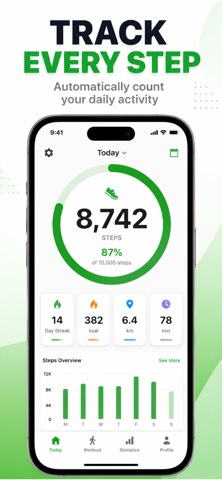
Track your daily steps, walking distance, calories burned, and workout sessions — all in one clean and easy-to-use app.
No ads. No accounts. No unnecessary complexity.
Everything works directly on your device using Apple Health integration.
Track Your Daily Activity
• Accurate step counting using Apple Health
• Real-time progress toward your daily goal
• Walking distance tracking
• Calorie burn estimation
• Floors climbed tracking
Stay motivated with clear progress visuals and daily performance insights.
Workout Tracking
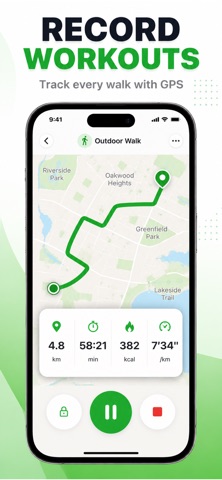
Start a walking workout anytime.
• Track duration, distance, and pace
• View route on the map
• Save detailed workout summaries
• Review your workout history
Perfect for daily walks, fitness goals, and improving consistency.
Powerful Statistics
Understand your progress over time.
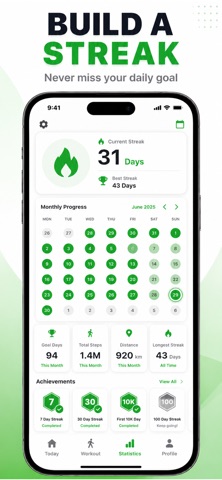
• Daily, weekly, and monthly step history
• Trend graphs with average comparison
• Goal tracking and performance overview
• Detailed workout statistics
See how your activity improves week after week.
Designed for Simplicity
• Clean and minimal interface
• Fast performance
• Offline support
• No ads
• Secure and private
Your health data stays on your device.
Premium Features
Upgrade to unlock:
• Full activity history
• Advanced statistics and trends
• Distance, calorie, and floor analytics
• Unlimited workout records
Premium helps you gain deeper insights into your activity and progress.
Privacy First
We do not collect or sell your personal data.
Step Counter & Pedometer works securely with Apple Health to access step and activity information.
Your data remains under your control.
Start moving today.
Download Step Counter & Pedometer and build a healthier daily routine.
term of use: https://apple.com/legal/itunes/appstore/dev/stdeula/
privacy policy: https://www.emzirmetakibi.com/steptracker/privacy.html
Popular uses
- Keep consistent personal activity or routine records.
- Review entries and app permissions before comparing records over time.
How to get started
- Read how the app obtains its data and what input it needs from you.
- Set up a small logging routine and check dates, units, and permissions.
- Review the saved entries and any available export controls before relying on a long history.
Common questions and problems
Two apps show different values
Compare their data sources, time periods, and settings. Similar labels do not establish identical measurements.
An entry is missing
Check the relevant permission or manual-entry workflow and the date range being displayed.
App details
- Category
- Health & Fitness
- Current version
- 1.2.1
- Store information checked
- Sep 30, 2026
Availability
Requires iOS 13.0. Availability and pricing may vary by region.