Clipboard Paste: Keyboard
Save reusable text and insert it from your keyboard.
View on the App StoreThis app is developed by SFByte.
Features and details from the App Store listing
Stop typing the same text again and again.
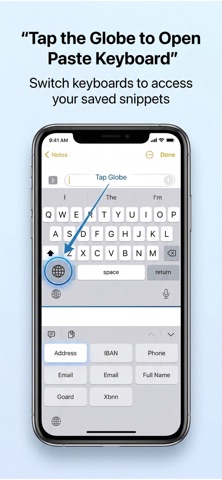
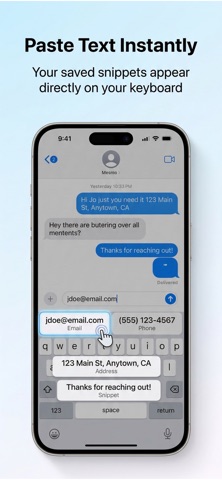
Paste Keyboard helps you save frequently used text and insert it instantly from your keyboard. Whether it's your email address, phone number, work templates, or quick replies, you can paste them anywhere with a single tap.
No more retyping the same messages every day.
Use Paste Keyboard in any app — WhatsApp, Messages, Instagram, Mail, Notes, and more.
How it works
Save your frequently used text as a snippet
Open your keyboard in any app
Tap a snippet to instantly paste it
It's the fastest way to reuse text on your iPhone.
Perfect for
• Email addresses
• Phone numbers
• Work templates
• Customer support replies
• Social media responses
• Meeting links
• Signatures
• Frequently used messages
Key Features
• Paste text instantly from your keyboard
• Save and organize snippets
• Favorites and pinned snippets
• Text shortcuts for faster typing
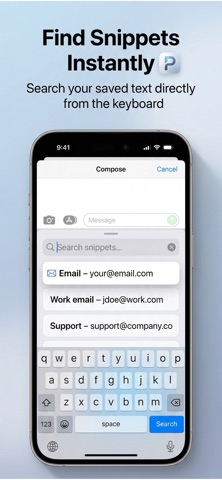
• Search snippets directly from the keyboard
• Simple and clean interface
• Works across all apps
Premium Features
• Unlimited snippets
• Text shortcuts
• Folders and categories
• Search in keyboard
• Favorites and pinned snippets
• Theme options
Privacy First
Your keyboard never collects or stores what you type.
All snippets are stored securely on your device.
Save time every day.
Paste faster with Paste Keyboard.
Term Of Use: https://www.apple.com/legal/itunes/appstore/dev/stdeula/
Privacy Policy: https://www.emzirmetakibi.com/pastekeybord/privacy.html
Popular uses
- Set up one repeatable routine around a clear task.
- Review whether reminders and records help you complete the work you intended.
How to get started
- Choose one task and configure the relevant timer, reminder, planner, or text workflow.
- Check notification and access settings with a small example.
- Review the result after the session and adjust the routine before adding more tasks.
Common questions and problems
A reminder did not appear
Check notification permissions, device focus settings, and the app’s current scheduling instructions.
The routine is too complicated to maintain
Reduce the setup to one clear action and a useful review point. Add detail only when it helps your actual task.
App details
- Category
- Utilities
- Current version
- 1.0
- Store information checked
- Sep 30, 2026
Availability
Requires iOS 16.0. Availability and pricing may vary by region.