Focus Keeper: Pomodoro Timer
Plan focused work or study sessions with a timer.
View on the App StoreThis app is developed by SFByte.
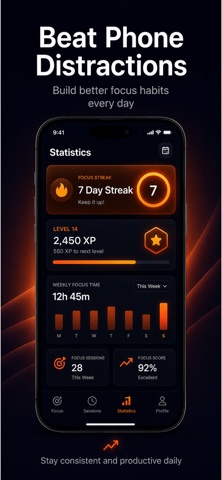
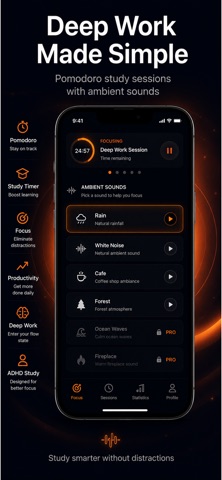
Features and details from the App Store listing
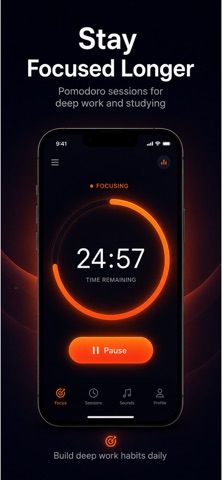
Focus Keep helps you stay focused, avoid distractions, and build better study and work habits using powerful Pomodoro sessions.
Whether you are studying for exams, working remotely, reading, coding, or trying to beat phone addiction, Focus Keep gives you a clean and motivating environment to stay productive every day.
Designed with a minimal dark interface and calming ambient sounds, Focus Keep makes deep focus feel simple and enjoyable.
STAY IN DEEP FOCUS
• Pomodoro focus timer
• Custom work and break sessions
• Deep work study mode
• Minimal distraction-free design
• Built for productivity and concentration
BUILD BETTER HABITS
• Track your focus streaks
• Gain XP and level up
• Monitor weekly progress
• Stay motivated with daily sessions
• Build long-term focus habits
AMBIENT SOUNDS FOR CONCENTRATION
• Rain sounds
• White noise
• Forest ambience
• Cafe sounds
• Relaxing background audio
PERFECT FOR
• Studying
• ADHD productivity
• Deep work
• Reading
• Writing
• Remote work
• Exam preparation
PREMIUM FEATURES
• Unlimited focus sessions
• Advanced statistics
• All ambient sounds
• Custom timer durations
• Full productivity tracking
Focus Keep is designed to help you spend less time distracted and more time getting things done.
Privacy Policy:
https://www.zenbyte.app/pomodoro/privacy.html
Terms of Use:
https://www.apple.com/legal/internet-services/itunes/dev/stdeula/
Popular uses
- Set up one repeatable routine around a clear task.
- Review whether reminders and records help you complete the work you intended.
How to get started
- Choose one task and configure the relevant timer, reminder, planner, or text workflow.
- Check notification and access settings with a small example.
- Review the result after the session and adjust the routine before adding more tasks.
Common questions and problems
A reminder did not appear
Check notification permissions, device focus settings, and the app’s current scheduling instructions.
The routine is too complicated to maintain
Reduce the setup to one clear action and a useful review point. Add detail only when it helps your actual task.
App details
- Category
- Productivity
- Current version
- 1.0
- Store information checked
- Sep 30, 2026
Availability
Requires iOS 16.0. Availability and pricing may vary by region.