
Habit Tracker: Pet & Self Care
Pair daily habit tracking with a virtual pet.
View on the App StoreThis app is developed by SFByte.

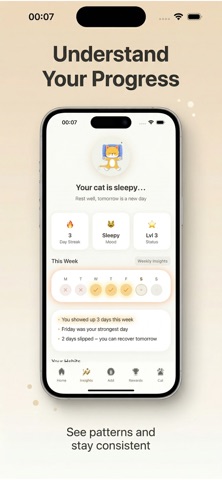
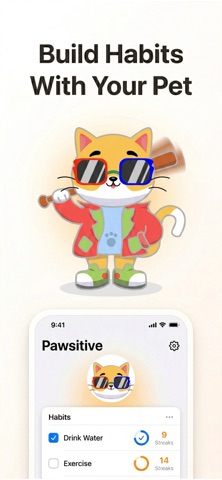
Features and details from the App Store listing
Build better habits with your pet.
Stay consistent, feel motivated, and never feel alone.
Pawsitive is a habit tracker that turns your daily routines into a rewarding and emotional experience. Every habit you complete helps your pet grow happier, stronger, and more alive.
This is not just a habit tracker.
This is your companion.
WHY IT WORKS
Your pet reacts to your life
• Complete habits and your cat becomes happy and energetic
• Miss habits and your cat feels low and needs your care
• Stay consistent to build connection and unlock rewards
You’re not tracking habits.
You’re taking care of your companion.
BUILD BETTER ROUTINES
Create habits that fit your life:
• Drink water, exercise, sleep, read, meditate
• Track daily routines and stay consistent
• Simple and fast habit tracking
• Designed for real daily use
SMART & EASY TRACKING
Stay focused without friction:
• One-tap habit completion
• Count-based and duration-based tracking
• Clean and minimal interface
• Fast and private, works on-device
STAY MOTIVATED
Turn progress into something you feel:
• Earn XP for completed habits
• Level up your pet
• Unlock rewards and room items
• Visual progress that keeps you going
INSIGHTS & CONSISTENCY
Understand your habits:
• Daily and weekly progress
• Habit completion stats
• Simple insights to stay on track
PREMIUM FEATURES
Unlock the full experience:
• Unlimited habits
• Advanced insights and trends
• Exclusive pet reactions
• Faster progression and rewards
Perfect for building habits, improving self care, and staying consistent every day.
Download now and start growing with your pet.
Privacy Policy:
https://www.zenbyte.app/cathabittracker/privacy.html
Terms of Use:
https://www.apple.com/legal/itunes/appstore/dev/stdeula/
Popular uses
- Define one behavior you want to record consistently.
- Review a pattern without treating a streak counter as the full explanation of progress.
How to get started
- Choose a clear definition for the event you will log.
- Set up reminders and a small example using the app’s documented controls.
- Review entries regularly and correct mistaken dates without losing useful context.
Common questions and problems
A streak differs from your own count
Check the app’s day boundaries, time zone, and definition of a completed entry.
Notifications are not useful
Adjust frequency or disable unnecessary reminders so the logging routine remains practical.
App details
- Category
- Productivity
- Current version
- 1.0
- Store information checked
- Sep 30, 2026
Availability
Requires iOS 15.0. Availability and pricing may vary by region.