Quit Habit Tracker: Streaks
Track habit streaks and record the context around a reset.
View on the App StoreThis app is developed by SFByte.
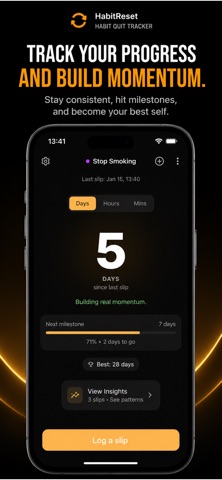
Features and details from the App Store listing
Every day counts — even after a reset.
Track how many days it’s been since you quit a habit and understand what breaks your streak.
No judgment. Just clarity, progress, and momentum.
What is Habit Quit Tracker?
Habit Quit Tracker is a simple yet powerful habit counter designed for quitting habits and staying consistent — without pressure or guilt.
Whether you’re quitting sugar, alcohol, smoking, social media, or any habit that holds you back, Habit Quit Tracker helps you focus on progress instead of perfection.
Why it works
Most habit apps only count streaks.
Habit Quit Tracker goes further by helping you understand resets, patterns, and triggers — so you can improve over time, not start over.
Key features
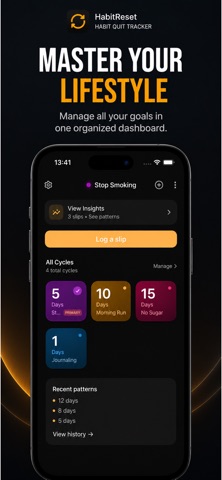
• Count days since your last reset
• Track streaks and clean days
• Log slips without losing progress
• See patterns behind your habits
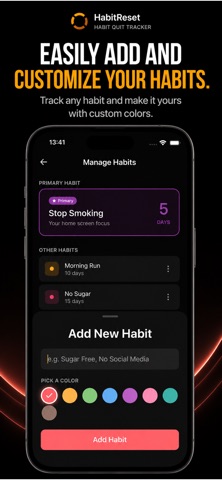
• Focus on one main habit while tracking others quietly
• Clean, distraction-free design
• No accounts. No pressure. Just progress.
Built for real life
Progress isn’t linear.
Slipping doesn’t erase your effort — it teaches you.
Habit Quit Tracker is built for real people building discipline one day at a time.
Premium (optional)
Unlock deeper insights with premium features:
• Pattern detection and habit insights
• Smart reminders at the right moments
• Unlimited habits
• Advanced statistics
Free to start. Upgrade anytime.
Start today
You’re not starting over.
You’re starting smarter.
Terms of Use: https://www.apple.com/legal/internet-services/itunes/dev/stdeula/
Privac Policy :https://www.emzirmetakibi.com/habitrack/privacy.html
Popular uses
- Define one behavior you want to record consistently.
- Review a pattern without treating a streak counter as the full explanation of progress.
How to get started
- Choose a clear definition for the event you will log.
- Set up reminders and a small example using the app’s documented controls.
- Review entries regularly and correct mistaken dates without losing useful context.
Common questions and problems
A streak differs from your own count
Check the app’s day boundaries, time zone, and definition of a completed entry.
Notifications are not useful
Adjust frequency or disable unnecessary reminders so the logging routine remains practical.
App details
- Category
- Health & Fitness
- Current version
- 1.0.12
- Store information checked
- Sep 30, 2026
Availability
Requires iOS 13.0. Availability and pricing may vary by region.