Stay Secure & Ad Block
Manage DNS filtering to reduce unwanted connections.
View on the App StoreThis app is developed by SFByte.
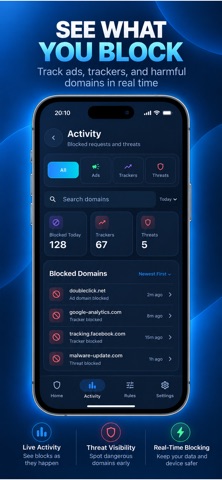
Features and details from the App Store listing
Fewer unwanted connections. More control over your browsing.
Stay Secure & Ad Block is a DNS filtering and privacy utility that helps reduce unwanted connections while you browse and use supported apps. It blocks DNS requests to known advertising, tracking, phishing, scam, and malicious domains included in your active protection lists and rules.
DNS PROTECTION
Filter requests to listed domains at the DNS level, before a connection is established through that lookup.
AD BLOCKING
Reduce connections to known advertising domains across supported apps and websites.
TRACKER BLOCKING
Help limit connections to known tracking and analytics domains.
PHISHING & SCAM DOMAIN BLOCKING
Block requests to domains identified in the active lists as phishing or scam sites.
MALICIOUS DOMAIN BLOCKING
Block requests to domains associated with known malicious activity when they match the filtering rules.
YOUR RULES, YOUR CONTROL
With Premium, add domains to a custom blocklist and allow trusted domains with an allowlist. Kids Mode restricts access to allowlisted domains and their subdomains. Set up your trusted sites before enabling it.
SEE YOUR PROTECTION AT WORK
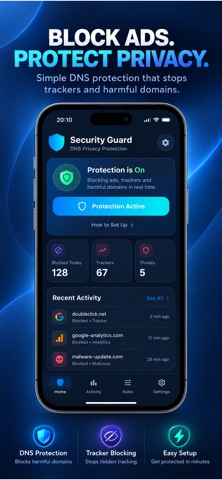
Check protection status, blocking statistics, and recent blocked domains in one place. Enable protection, approve the configuration requested by iOS, and confirm that protection is active. Keep protection-list updates enabled to receive available rule updates.
FREE & PREMIUM
Start with an essential ad and tracker protection list, statistics, and limited recent activity. Premium adds expanded lists, custom rules, an allowlist, Kids Mode, and access to the retained activity history.
DNS filtering works with supported network traffic. It cannot block every ad or harmful connection, including content served from the same domains as content you want to view. Coverage depends on the active lists, apps, and network settings. The app filters domains; it does not scan files or remove malware.
Premium is an auto-renewing subscription. Review the price and billing period before purchasing. Manage or cancel your subscription in your App Store account settings.
Terms of Use
https://www.apple.com/legal/itunes/appstore/dev/stdeula/
Privacy Policy
https://www.zenbyte.app/securityguard/privacy.html
Popular uses
- Review a specific privacy task and the permissions it requires.
- Keep recovery and support information accessible before changing a setting.
How to get started
- Read the current listing and privacy policy for the exact protection the app describes.
- Configure one supported task and check that the intended service or workflow still works.
- Review exclusions, recovery options, and support instructions before broadening the setup.
Common questions and problems
A setting interferes with a site or service
Review the app’s documented controls and change one setting at a time. Keep a way to return to the previous working setup.
A protection claim seems broader than the listing
Use the specific documented scope. A browser, filter, or password tool does not automatically protect every activity on a device.
App details
- Category
- Utilities
- Current version
- 1.6.8
- Store information checked
- Sep 30, 2026
Availability
Requires iOS 15.0. Availability and pricing may vary by region.