White Noise & Sound Machine
Play background sounds for your nighttime or relaxation routine.
View on the App StoreThis app is developed by SFByte.
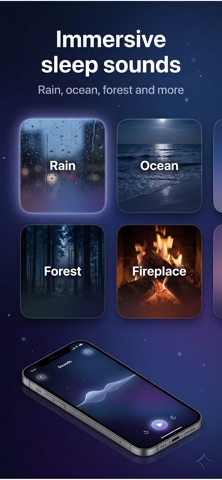
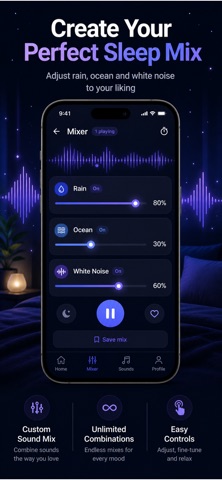
Features and details from the App Store listing
Fall asleep faster. Stay asleep all night. Wake up refreshed.
This is not just a sleep sounds app.
It’s your nightly reset.
Sleep Sound helps you relax your mind, reduce stress, and drift into deep, uninterrupted sleep using carefully designed soundscapes and intelligent audio mixing.
No accounts. No distractions. Just sleep.
---
WHY PEOPLE LOVE IT
• Fall asleep in minutes with calming sounds
• Block noise and distractions instantly
• Stay asleep longer without interruptions
• Wake up feeling clear and energized
Trusted by thousands of sleepers looking for real results.
---
IMMERSIVE SOUND EXPERIENCE
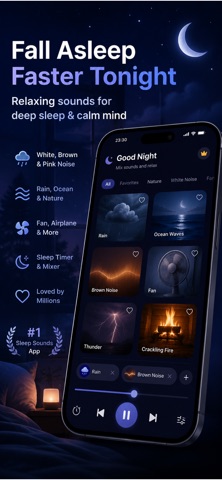
Choose from high quality, looped soundscapes designed for deep relaxation:
• Rain and soft storms
• Ocean waves and deep water ambience
• Forest and night nature sounds
• White noise and brown noise
• Fireplace and cozy environments
Every sound is crafted to play seamlessly without breaks, so you never feel the loop.
---
CREATE YOUR PERFECT MIX
Build your own custom environment:
• Mix multiple sounds together
• Adjust volume for each sound
• Save your favorite combinations
• Create the perfect atmosphere for your sleep
Your sleep, your control.
---
SMART SLEEP TIMER
• Set how long sounds should play
• Automatic fade-out for natural sleep
• No sudden stops or interruptions
You fall asleep — the app handles the rest.
---
FOCUSED. SIMPLE. POWERFUL.
No complicated features. No clutter.
Just press play and sleep.
---
PREMIUM FEATURES
Unlock the full experience:
• Unlimited sound library
• Advanced sound mixing
• Extended timer options
• Exclusive premium soundscapes
• Ad-free experience
---
Start sleeping better tonight.
Download now and experience the difference.
---
Terms of Use:
https://www.apple.com/legal/itunes/appstore/dev/stdeula/
Privacy Policy:
https://www.zenbyte.app/sleepsounds/privacy.html
Popular uses
- Prepare a simple sound, timer, or personal recording routine.
- Review interruptions, privacy settings, and available controls before a longer session.
How to get started
- Choose the function described in the listing and check required permissions.
- Try a short session at a comfortable setting and confirm the intended controls.
- Review any saved record and stop or adjust the routine if it does not suit your use.
Common questions and problems
Playback or a timer stopped unexpectedly
Check the app’s documented background behavior, device settings, and available sleep-timer controls.
A recording is missing or unclear
Review microphone access and the app’s recording instructions. A personal recording is not by itself a diagnosis.
App details
- Category
- Health & Fitness
- Current version
- 1.4.5
- Store information checked
- Sep 30, 2026
Availability
Requires iOS 15.0. Availability and pricing may vary by region.