Snore Recorder: Sleep Tracker
Record overnight sounds and review a timeline of recordings.
View on the App StoreThis app is developed by SFByte.
Features and details from the App Store listing
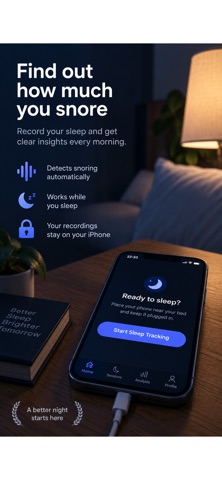
Record snoring overnight and review your night in the morning. Snore Recorder: Sleep Tracker helps you listen to detected snoring, explore your timeline, and compare patterns across nights.
RECORD YOUR NIGHT
Start a session before bed and place your iPhone near your bed. The app listens for snoring sounds while you sleep and saves clips for you to review.
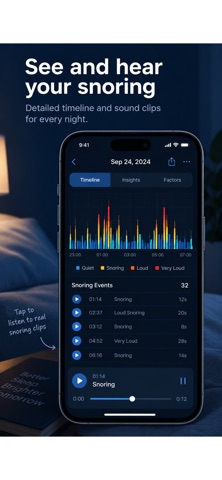
HEAR YOUR SNORING
Play recorded clips and see when snoring was detected. Review your nightly summary, snoring duration, and timeline to understand your own patterns.
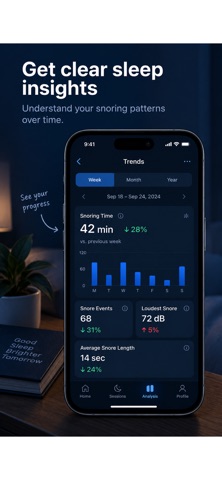
COMPARE YOUR NIGHTS
Log factors such as nasal strips, sleeping position, congestion, or alcohol before bed. Compare nights with and without a factor using your own recordings. These comparisons show associations; they do not establish what causes or treats snoring.
PRIVATE, ON-DEVICE ANALYSIS
Audio is analyzed on your iPhone. Your recordings stay on your device and are not uploaded to external servers. No wearable device is required.
OPTIONAL PREMIUM
Premium features require a purchase. Available plans and prices are shown in the app before you buy. Subscriptions renew automatically unless canceled at least 24 hours before the current period ends. Manage or cancel your subscription in your App Store account settings.
Snore Recorder is a personal sound-tracking tool, not a medical device. It does not diagnose sleep apnea or other medical conditions.
Privacy Policy: https://www.zenbyte.app/snorerecorder/privacy.html
Terms of Use: https://www.apple.com/legal/itunes/appstore/dev/stdeula/
Popular uses
- Prepare a simple sound, timer, or personal recording routine.
- Review interruptions, privacy settings, and available controls before a longer session.
How to get started
- Choose the function described in the listing and check required permissions.
- Try a short session at a comfortable setting and confirm the intended controls.
- Review any saved record and stop or adjust the routine if it does not suit your use.
Common questions and problems
Playback or a timer stopped unexpectedly
Check the app’s documented background behavior, device settings, and available sleep-timer controls.
A recording is missing or unclear
Review microphone access and the app’s recording instructions. A personal recording is not by itself a diagnosis.
App details
- Category
- Medical
- Current version
- 1.1.2
- Store information checked
- Sep 30, 2026
Availability
Requires iOS 15.0. Availability and pricing may vary by region.