
SellerKit:Editor for eCommerce
Prepare product photos for online marketplace listings.
View on the App StoreThis app is developed by SFByte.
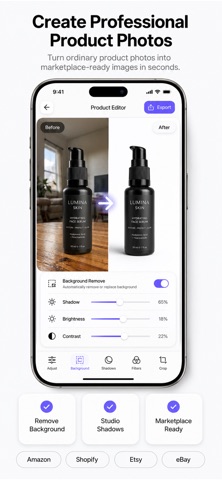


Features and details from the App Store listing
Turn ordinary product photos into professional marketplace-ready images in seconds with SellerKit.
SellerKit is built for online sellers who want clean, high-converting product photos without complicated editing. Whether you sell on Amazon, Etsy, Shopify, eBay, Facebook Marketplace, or your own store, SellerKit helps you create professional product images quickly and easily.
FEATURES
• Remove Background
Create clean, professional product photos with a single tap.
• Product Photo Editor
Adjust brightness, contrast, saturation, shadows, highlights, and more.
• Professional Shadows
Add realistic studio-quality shadows to make products stand out.
• Ready-Made Templates
Use professionally designed templates for different product categories.
• Batch Processing
Edit multiple product photos at once and save valuable time.
• Marketplace Ready
Prepare images optimized for Amazon, Etsy, Shopify, eBay, and other marketplaces.
• Smart Crop & Resize
Resize your product photos for every marketplace and social media platform.
• High Resolution Export
Export crisp, high-quality images without compromising quality.
• No Watermarks
Create clean professional images without unwanted branding.
• Fast & Easy Workflow
Designed to help sellers create listing photos in just a few taps.
Perfect For
• Amazon Sellers
• Etsy Shops
• Shopify Stores
• eBay Sellers
• Facebook Marketplace
• Small Businesses
• Online Retailers
• Product Photographers
• Print-on-Demand Sellers
Whether you're launching your first product or managing thousands of listings, SellerKit helps you create professional product photos that stand out and save hours of editing time.
Download SellerKit today and create stunning product photos with ease.
Privacy Policy:
https://www.zenbyte.app/sellerkit/privacy.html
Terms of Use (Apple Standard EULA):
https://www.apple.com/legal/internet-services/itunes/dev/stdeula/
Popular uses
- Keep a reviewable group of photos organized around an event or task.
- Prepare a separate delivery image while retaining an original you may need again.
How to get started
- Choose a small group of photos and review the access the app requests.
- Use the organization or editing functions described in the listing, checking selection and preview carefully.
- Review the saved result or library change before applying the same operation to a larger batch.
Common questions and problems
Some photos do not appear
Review the app’s photo-access selection and whether the originals are available locally. Start with a known accessible item.
A cleanup or edit affects the wrong item
Stop the batch, compare the selected items with the intended ones, and check the app’s supported recovery or undo behavior before continuing.
App details
- Category
- Graphics & Design
- Current version
- 1.0.3
- Store information checked
- Sep 30, 2026
Availability
Requires iOS 16.0. Availability and pricing may vary by region.