1280×720 Aspect Ratio Explained: Is 720p 16:9?
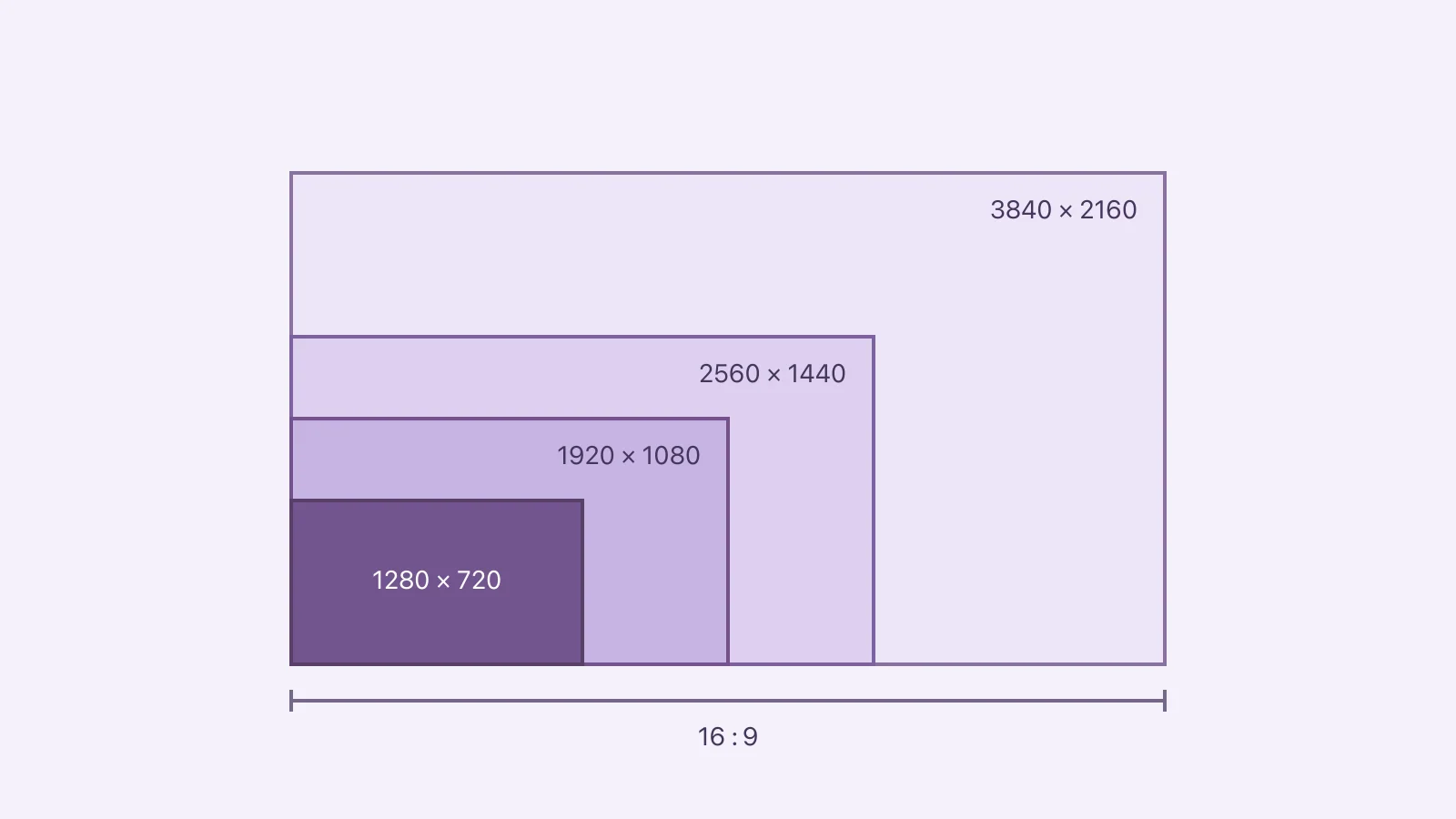
1280×720 is a 16:9 aspect ratio and is commonly called 720p HD. Divide both dimensions by 80: 1280 ÷ 80 = 16 and 720 ÷ 80 = 9. The ratio describes the rectangle’s shape; the dimensions describe how many pixels it contains. A 1920×1080, 2560×1440 or 3840×2160 image can have the same 16:9 shape at a different resolution. Reversing the dimensions to 720×1280 gives a portrait 9:16 frame instead.
Check the dimensions or calculate a new size
Enter width and height in pixels. For a proportional resize, choose the new width and keep the calculated height. This calculator computes dimensions; it does not edit or upload your video.
Calculate the ratio and resized dimensions
Why 1280 by 720 simplifies to 16:9
Width divided by height is 1280 ÷ 720, approximately 1.7778. The greatest common divisor is 80, so dividing both sides by 80 gives 16:9 exactly. You can also check a candidate size by cross-multiplying: width × 9 must equal height × 16 for an exact 16:9 rectangle.
For 1280×720, both products equal 11,520. The calculation assumes square pixels, as used in this ordinary digital-resolution comparison. Legacy formats with non-square pixels require their display/pixel-aspect metadata too; the stored dimensions alone may not describe how they should be displayed.
Compare 720p, 1080p, 1440p and 4K UHD
| Dimensions | Common label | Ratio | Pixels per frame | Pixels relative to 720p |
|---|---|---|---|---|
| 1280 × 720 | 720p HD | 16:9 | 921,600 | 1.00× |
| 1920 × 1080 | 1080p | 16:9 | 2,073,600 | 2.25× |
| 2560 × 1440 | 1440p | 16:9 | 3,686,400 | 4.00× |
| 3840 × 2160 | 4K UHD | 16:9 | 8,294,400 | 9.00× |
YouTube’s resolution guidance lists these sizes for 16:9 video. The pixel counts and relative factors above are arithmetic. The 4K UHD row contains nine times as many pixels as 720p, but that does not guarantee nine times the compressed file size.
“720p” describes progressive video with 720 lines of vertical resolution. For an ordinary 1280×720 image, using the same HD label describes its dimensions; a still image does not have a playback frame rate. Ratio, resolution and FPS answer different questions.
Resize without stretching
If a 1280×720 source must become 1920 pixels wide while preserving shape, calculate 1920 × 9 ÷ 16 = 1080 pixels high. At 640 pixels wide, the matching height is 360. When a destination requires whole pixels, a rounded result can be slightly different from an exact mathematical ratio; multiples of 16×9 avoid that issue for these sizes.
Increasing the pixel dimensions does not restore detail the source never contained. Check small writing or faces after resizing. If the delivery requirement is simply “16:9,” ask whether it also specifies a minimum resolution and a maximum file size before making a larger copy.
Fit, crop or stretch when the shapes differ
| Operation | What happens | When to inspect carefully |
|---|---|---|
| Fit inside a 16:9 canvas | The whole source remains; unused space may be visible | Background/padding appearance |
| Crop to 16:9 | Part of the source is removed | Faces, captions and objects near edges |
| Stretch to 16:9 | Horizontal and vertical proportions change unequally | Distorted people, circles and text |
A portrait 720×1280 clip is 9:16. Rotating it is not the same as reframing upright portrait content into a landscape composition. Use turning landscape video into portrait for the reverse task and resizing images without stretching for proportional still-image work.
If a video player already adapts to different shapes, adding permanent black bars to the file can be unnecessary. Check the destination’s requirements before baking a frame into the pixels.
Does 1280×720 guarantee a small file?
No. Duration, total average bitrate, codec and other encoding choices determine the byte budget. A long 720p clip can exceed a short 4K clip. Use the Video Size Calculator and why video files are large for that question.
For capturing new footage, 1080p versus 4K helps distinguish recording needs from a delivery resize. For temporal motion rather than image shape, read 30 FPS versus 60 FPS.
Is 1280×720 4:3?
No. Its exact reduced ratio is 16:9. A 1280-pixel-wide 4:3 rectangle would be 960 pixels high.
Is 1920×1080 a different shape?
No. It is also 16:9, with 2.25 times as many pixels per frame as 1280×720. That is a pixel-count comparison, not a storage or quality multiplier.
Is every resolution described as 4K 16:9?
This comparison uses 3840×2160 UHD. Always inspect the actual dimensions rather than relying only on a marketing label.
Sources & further reading
- YouTube Help · Checked Oct 5, 2026